
发布时间:2025-04-26 20:23:45 阅读量:282 来源:小友
When adding potential customers, there are the following system default content: name, birthday, gender, school, main contact person, current age, alternate contact person, home address, intent and other 13 attributes.
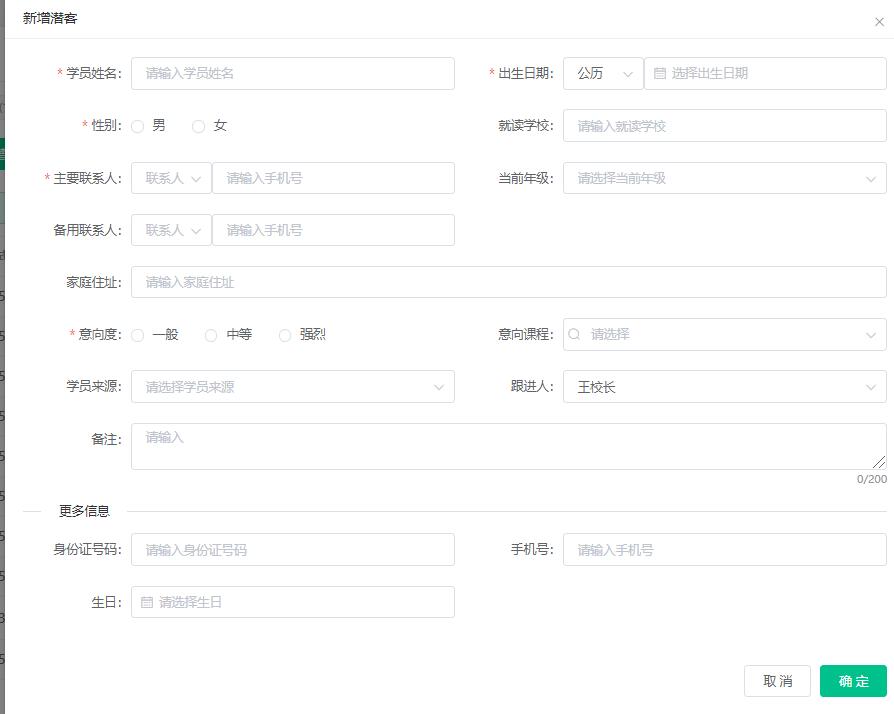
But what should some training institutions do if they need to enter some other information? At this time, you need to use the custom attribute function of the member.
Student custom attribute operation method:
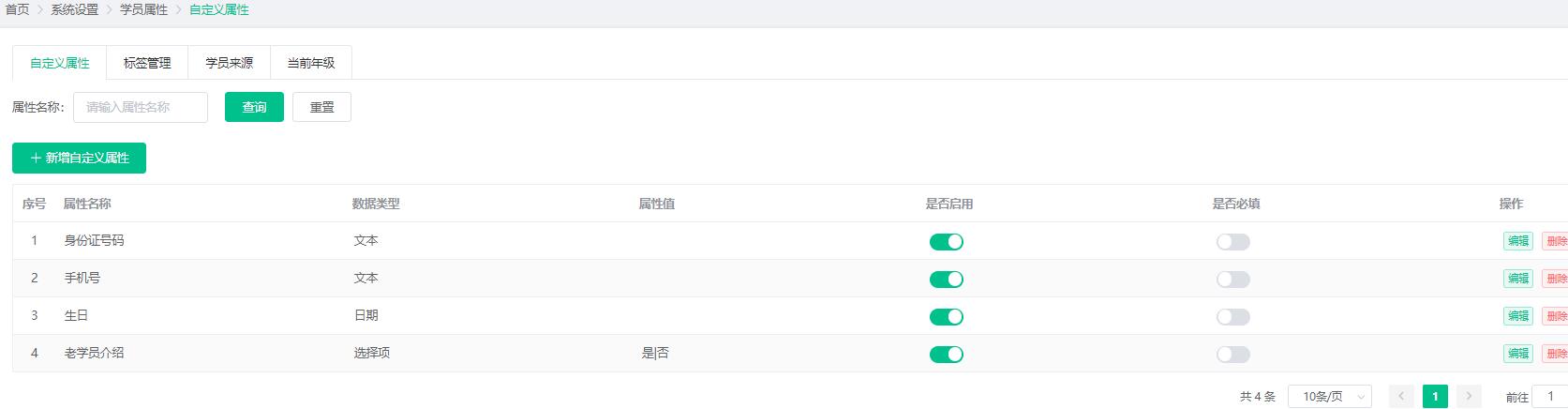
1. Enter the system-Student Attributes-add custom attributes.
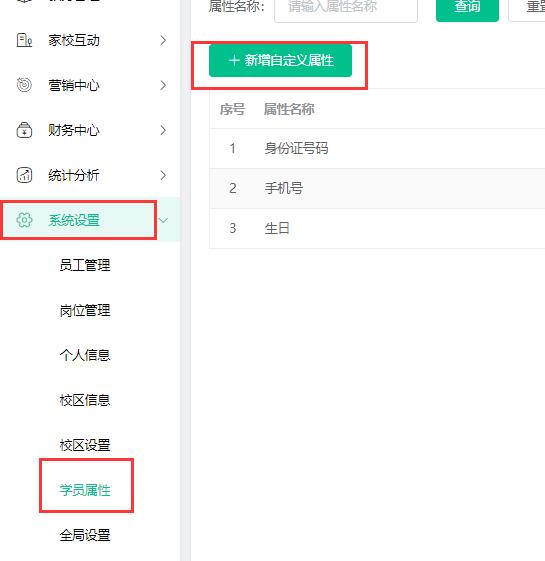
2. Enter custom attributes.
There are currently three attribute types,Selection, date, number, text。
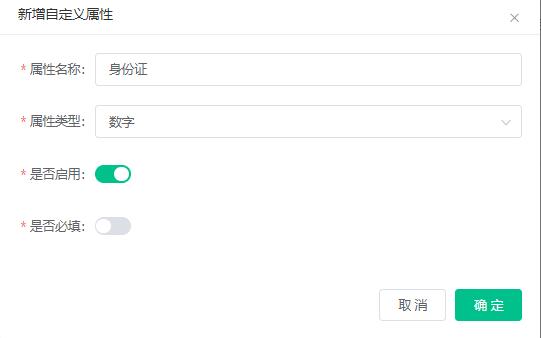
If you need to fill in the ID number of the entrant, please fill in this way.
Attribute name: ID card
Attribute type: number (ID number is a number)
Whether to enable: enable
Whether it is required: If it is not required, it does not need to be enabled.
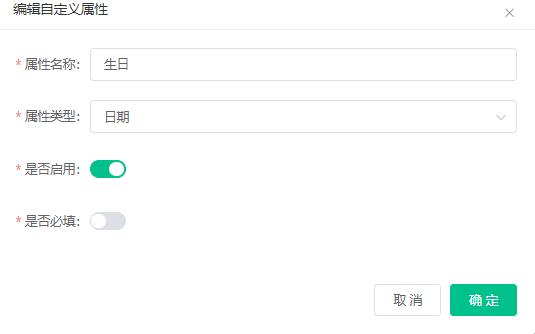
If you need to fill in the student's birthday, fill in like this
Attribute name: Birthday
Attribute type: Date (birthday is the date)
Whether to enable: enable
Whether it is required: If it is not required, it does not need to be enabled.
If you need to choose whether the student is an old student for introduction, fill in this way.
Attribute name: Introduction of old students
Attribute type: select (yes or no)
属性值:是|否(格式:XXX|XXX|XXX,多个选项以 ‘|’ 分隔,例如:’身份证|驾驶证|学生证’)
Whether to enable: enable
Whether it is required: If it is not required, it does not need to be enabled.
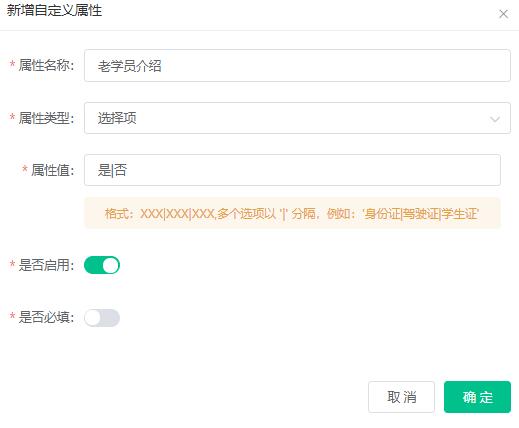
Another item is text. If you choose the attribute type to be text, you can enter the text yourself.
After clicking OK, the custom attributes will be displayed in the custom attributes list.
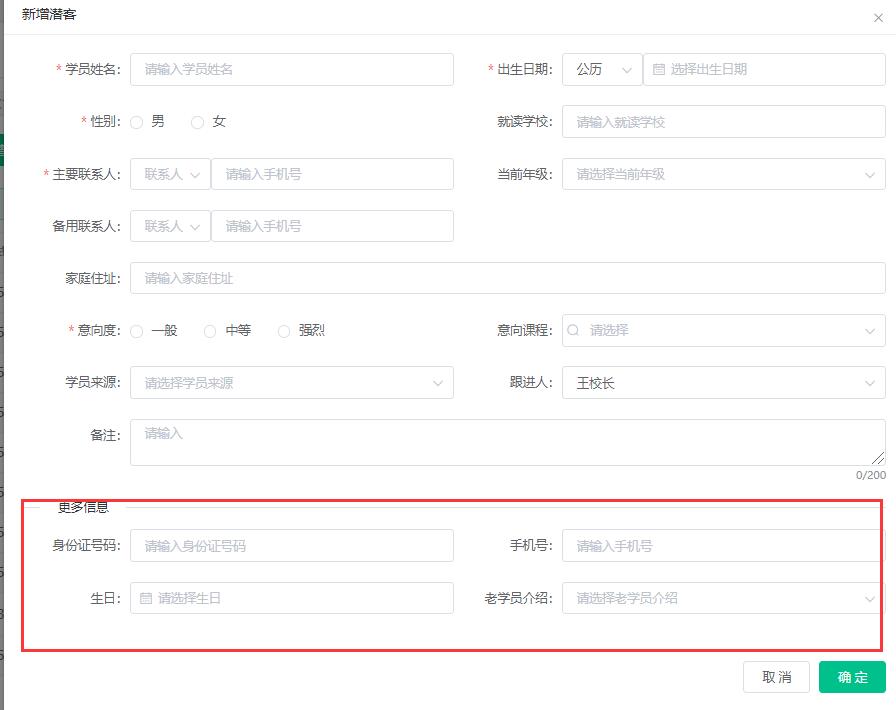
3. Click Enrollment Management-Visitor management-Add visitor, you can only see the new custom attributes displayed at the bottom of the dialog box.
成长档案 说明:任课老师可通过对班级或对应学员,以 上传图片 上传视频 提交文字内容的形式 编辑班级或对应学员 [&he...
人脸考勤说明:学员可通过对应的人脸绑定,实现学员的 签到 签退 学员自助上课点名,让家长更清楚的了解孩子的到校 [&he...
物品管理说明:主要是针对学员在报名时除课程外 其它物品的选择或购买 比如 教课书 学习用品等相关物品,可通过物 [&he...
最新资讯
2025-06-18 22:02:51
Analysis of the 2025 enrollment information of Nanyang Academy of Arts (NAFA) in Singapore2025-04-30 15:33:58
Fee management software for art training institutions, accurate management of school income and expenditure?2025-04-30 15:33:16
Which is the best academic affairs management system for education and training institutions?2025-04-30 15:32:41
Which is the best management system for training institutions?2025-04-30 15:31:52
Training institution management system promotes education and training institutions热门资讯
2025-04-23 12:59:08
What does verbatim mean? (How did the teacher write the verbatim draft?)2025-04-30 11:23:00
Functions, application scenarios, and functions of education and training school management software2025-04-23 20:26:56
I haven't been a teacher in a training institution, can I open a training institution?2025-04-23 20:47:54
How do small and medium-sized education and training institutions establish a human resource management system?2025-04-30 14:35:41
10 frequently asked questions for parents, applicable to training institutions
xiaoyoujiapei100
Haikou Ding Xiaoyou Network Technology Studio
Copy right© 2003-2022 Haikou Ding Xiaoyou Network Technology Studio & All Rights Reserved, All Rights Reserved. Qiong ICP No. 2022014728


 Training institution management system